Architecture Overview
This section describes the internal architecture and flow of DevInit CLI. The system is designed using a modular approach, ensuring a clean separation between user interaction, configuration processing, and project generation.
System Design Diagram
Below is a professional overview of the core modules and the flow of the application from user input to project success.
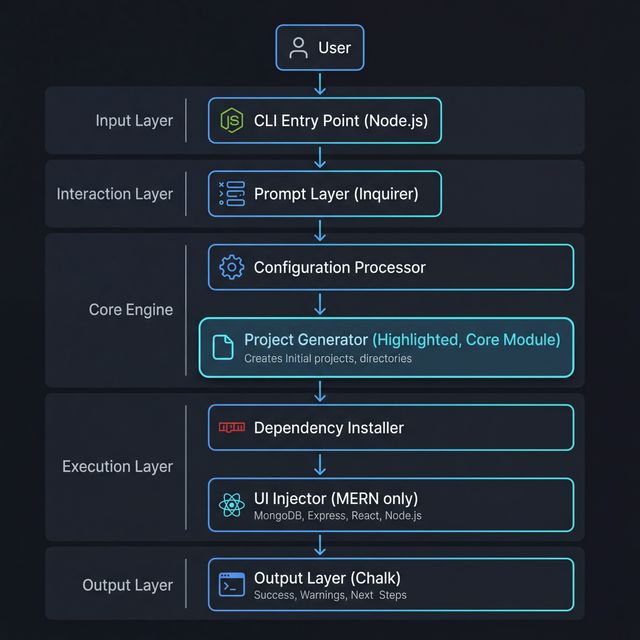
Architectural Layers
1. Input Layer
- User: Initiates the process by running the
devinitcommand. - CLI Entry Point (Node.js): The main executable that initializes the environment and checks for prerequisites.
2. Interaction Layer
- Prompt Layer (Inquirer): An interactive interface that collects critical data:
- Project Name: The unique identifier for the folder structure.
- Setup Mode: Choice between Quick Setup (defaults) or Custom Setup (granular control).
- Stack Selection: Selection of MERN, MEAN, or Next.js.
3. Core Engine
- Configuration Processor: Validates user inputs, handles directory conflicts, and prepares the internal configuration object.
- Project Generator (Core): The heart of the CLI. It handles the physical creation of directories and writes the boilerplate code for both backend and frontend layers.
4. Execution Layer
- Dependency Installer: Detects the available package manager (
npm,yarn, orpnpm) and installs all necessary libraries. - UI Injector: A specialized module (primarily for MERN) that injects starter templates and styles into the frontend folder.
5. Output Layer
- Logs (Chalk): Provides real-time, color-coded feedback to the user about the current execution step.
- Success Message: The final output indicating the project is ready for development.